Ocean of Programming

Wednesday, 21 February 2018

How to interface LM35(Temperature Sensor) with Arduino

February 21, 2018 0
How to interface LM35(Temperature Sensor) with Arduino
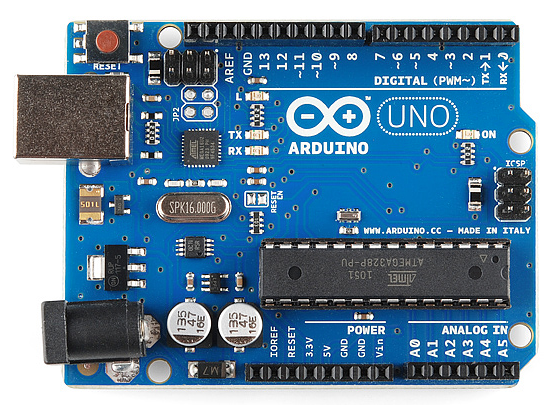
       In this article, I am going to explain how to connect LM35 with Arduino. The LM35 series are precision integrated-circuit temperature devices with an output voltage linearly proportional to the Centigrade temperature. It operates from 4 V to 30 V and Calibrated Directly in Celsius (Centigrade). It Rated for Full −55°C to 150°C Range and low-Impedance Output, 0.1 Ω for 1-mA Load. 
        From Arduino ADC we read the analog value and then we will convert it to the °C. Arduino has 10bit ADC so we need to multiply the read value by 1024 and divide it by the voltage provided to LM35 to get the temperature in °C.

void setup() {
Serial.begin(9600); 
}
void loop()  
{
int analog = analogRead(A0);
float MV = (analog/1024.0) * 5000; //5000 is the voltage provided
float celsius = MV/10;
Serial.print("In Degree Celsius= ");
Serial.println(celsius);
delay(1000);
}
          In the above program, I am reading the analog value from A0 pin and multiplying it by 1024 and dividing it by 5000. Diving it by 5000 is necessary due to supplied voltage to LM35 is 5V and 5000 it is in millivolts. Change the value according to your power to LM35 but put the value in millivolts only.
         Consider instead of 5V you provided 3.3V then put the value as 3300 if you put wrong value then you will get the wrong result. It will continuously read the temperature at the interval of 1000ms. If you are simulating in Proteus then must connect TXD of Arduino to the RXD of the serial window.
           After dumping the program into Arduino start serial monitor to observe the values. I am adding a screenshot of Protus Simulation software.
           Please feel free to comment if you find anything incorrect or you want to share more information about the topic discussed above.

Tuesday, 20 February 2018

How to interface LED with Arduino

February 20, 2018 0
How to interface LED with Arduino
            In this tutorial, I am going to tell you how to interface an LED with Arduino. I am using the inbuilt LED of Arduino for this tutorial. Inbuilt LED is present at pin number 13. When the output signal is HIGH then LED turns on and when the output signal is LOW then the LED is off. In between on and off provided 1000ms delay observing the output.
            In void setup, the setup is provided that is pin 13 is made as an output pin and in a void loop, the instructions are provided that executes continuously. In place of ledPin directly you can put pin number or LED_BUILTIN to connect the built-in LED.
int ledPin = 13;
void setup() {
  pinMode(ledPin,OUTPUT);
}
void loop() {
  digitalWrite(ledPin,HIGH);
  delay(1000);
  digitalWrite(ledPin,LOW);
  delay(1000);
}

Output When LED ON
Output when LED OFF
           Please feel free to comment if you find anything incorrect or you want to share more information about the topic discussed above.

Sunday, 31 December 2017

while statement in C programming

December 31, 2017 0
while statement in C programming
        In the previous article, we have seen if, if....else Statement in C programming if you did not read the previous article you read it before proceeding further.
       Loops are used to execute some block of statements repeatedly. It executes until termination condition gets executed. Types of loop statement are
1. if statement
2. while statement
3. do-while statement

while statement

           In while statement first the expression is tested. If true then program enters into the while loop and executes statements of while and after execution of all statements again condition is tested. If the condition is true then while loop again executed and it continues until the condition becomes false. If the condition becomes false the loop terminates and control comes out of while loop.

The syntax for while statement:

while(expression)
{

            statement 1;

            statement 2;

            statement 3;
} 
 Flowchart of while statement

Program 1

#include<stdio.h>
int main()
{
        int i=0;
        while(i<20)         
 {
     printf("%d ",i);
       i = i+2;
   }
     printf("\n");
}
The output for above program is

 Program 2: To find factorial of a given number

#include<stdio.h>
int main()
{
     int n,num;
     long long fact;
     printf("Enter a number\n");
     scanf("%d",&num);
     n=num;
     fact=1;
     if(num&gt0)
         printf("Factorial of negative number is not possible\n");
     else
     {
         while(num>1)
         {
              fact = fact * num;  //fact*=n;
              num--;
         }
         printf("The factorial of a number %d is %lld\n",n,fact);
     }
}
The output for above program is
              Note that we must need to mention expression otherwise it will give error as
        Please feel free to comment if you find anything incorrect or you want to share more information about the topic discussed above.

Sunday, 23 July 2017

if, if....else Statement in C programming

July 23, 2017 0
if, if....else Statement in C programming
        In the previous article we have seen How to Download and Install Code::Blocks and How To Create and Run Project In Code::Blocks if you did not read the previous article you read it.        
          The if, if....else and nested if ... else statements are used for decision purpose. In simple word you can say if this condition satisfies then execute this otherwise execute other. E.g If we entered one integer and we want to find it is even number or odd number. This decision can be made using if as well as if...else statement. if statement needs two condition as num%2==0 and num%2==1. If first condition is satisfies it returns num%2==0 statement otherwise it returns n%2==1 statement. In if .... else statement we need only one condition num%2==0. If even number is provided then it returns the first statement otherwise it returns the second statement. In the case of nested if ... else statement there are multiple statements are checked and returns satisfied condition. Let us see each one by one.

 if Statement

         The if statement is decision making statement used to control the flow of execution of a statement. If the condition whatever it is, statement execute the body of if, if and only if the condition is true. If the condition is not true, then the statement is not executed and the computer goes directly to the next statement. 
The general form of if statement is
if(test condition)
{
 body of if statement;
}
        The test condition must be always enclosed within the pair of brackets( ). The test condition should not end with semicolon it indicates that end condition it comes out of the loop without further checking condition. Let us understand the working of if statement with the example.
#include<stdio.h>
int main()
{
        int x=50,y=70;
        if(x<y)
   {
      printf("y is greater than x\n");
   }
} 
The output for the above program is
       In the above program, it prints "y is greater than x" because the condition is true.See another program.
#include<stdio.h>
int main()
{
        int x=50,y=70;
   if(x>y);
   {
      printf("y is greater than x\n");
   }
} 
The output for the above program is
      In the image, you can see that the output for both programs is the same. But there is a difference in both program output. In the first statement, the printf statement is executed because the condition is true. In the second program, the condition is false still it is printing statement. This happened because we provided semicolon at the end of if statement. Due to semicolon if statement comes out of the loop without checking condition and printf statement print like a simple print statement. There is no relation with if the condition is true or false.

if ... else Statement

        Similar to if statement, if .. else is also a decision making statement. if...else statement has both true and false condition. If the condition is true then if part is executed otherwise else part is executed.

The general form of if .. else statement is

#include<stdio.h>
int main()
{
        if(test condition)
        {
                body of if statement
        }
        else
        {
                body of else statement
        }

}
         The condition of if part is true then if part is executed and else part is skipped and if the else part is executed when the if condition is skipped. Let us see the following program for better understanding.
#include<stdio.h>
int main()
{
        int x=10,y=20;
        if(x<y)
        {
                printf("x is less than y\n");
        }
        else
        {
                printf("y is less than x\n");
        }
}
The output for the above program is
       
         In the above program the condition of if statement is true so if part is executed and the else part is skipped. For non zero value if part is executed and for zero else part is executed. Let us consider the following example for better understanding.
#include<stdio.h>
int main()
{
        if(1)
        {
                printf("This is if part\n");
        }
        else
        {
                printf("This is else part\n");
        }

}
The output for above program is
       In above program, if condition contains 1 that is non-zero value so the if part is executed and else part is skipped. Let us consider if condition contains zero value.
#include<stdio.h>
int main()
{
        if(0)
        {
                printf("This is if part\n");
        }
        else
        {
                printf("This is else part\n");
        }

}
The output for above program is
          In above image you can see that for if condition zero the else part is executed. This is important to know when if part is executed and when else part is executed. There are some chances of asking a question in C aptitude test.
        Please feel free to comment if you find anything incorrect or you want to share more information about the topic discussed above.

Wednesday, 17 May 2017

How To Create and Run Project In Code::Blocks

May 17, 2017 0
How To Create and Run Project In Code::Blocks
        In the previous post, we have seen how to download and install Code::Blocks for C programming. If you did not read that article then read How to Download and Install Code::Blocks before proceeding further.
       The code block is a popular application for C Programming. It is open-source, cross-platform, free C, C++ and Fortran IDE. Using Code::Blocks we can write C code, compile and run it. It popular application and free to use. 
       In this post, I am going to explain how to run and compile C program code in Code::Blocks. Lets us follow the procedure. The procedure is same for every project. 
        In the first step you have to double-click on the Code::Blocks icon which on the desktop. After that, you will see window like this and you have to click on Create New Project.
         After selecting Create New Project the new window will pop up named New From Template and you have click on Console Application click on Go.
       After selecting clicking on Go yo will pop up a new window named Console Application and you have to select C or C++ project. We are creating C project so select C and click on Next.
         After that, you have to enter the project name and path for saving the program. I have given the name sample and selected path as a desktop. You give your program name and required the path for saving the program. Path selection is a must for the first time it cannot select path automatically. After that click on Next.
After that, you will pop up a new window of the compiler. You can change another compiler but keep GNU GCC Compiler or if another option is selected then change and select GNU GCC Compiler and click on finish. You will see new project window.
          After that double click on Sources and new sub-menu main.c will open and double-click on that menu.c file and you will see a new file with some pre-written code.
           For compile the code select build option from Build menu or press Ctrl+F9.
        After completing compilation click on run from Build menu or press Ctrl+F10. A new black window pops up with output.
           In the above image, the output of the program is shown. 
           Note: If  installing Code::Blocks second time then it might give error if program is correct in this situation you may first delete registry files of Code::Blocks and uninstall and again install Code::Blocks it will start working but be careful if by mistake you deleted the other files it may damage your computer. Try deleting registry files only if you know all the things. I have tried this and its worked on my computer. For any damage to your computer by deleting registry file I am not responsible for that try at your own risk.
        Please feel free to comment if you find anything incorrect or you want to share more information about the topic discussed above.

Tuesday, 9 May 2017

How to Download and Install Code::Blocks

May 09, 2017 0
How to Download and Install Code::Blocks
Ocean of Programming
        The code block is a popular application for C Programming. It is open source, cross-platform, free C, C++ and Fortran IDE. Using Code::Blocks we can write C code, compile and run it. It popular application and free to use. In this article, I am going to explain how to download and install it. Most people download and install the incorrect file and they face difficulties in compiling and running the C program. It is very simple to download install and configure the Code::Blocks. The current version of Code::Blocks is 16.01 which is released on Thursday, 28 January 2016 10:21which has many improvements, new plugins and features, more stable and major code completion enhancement. The Code::Blocks is available for
  • Windows XP / Vista / 7 / 8.x / 10
  • Linux 32-bit
  • Linux 64-bit
  • Mac OS X
         We need to download according to our operating system. I am downloading and installing Code::Blocks on Windows 10Let's see one by one with the help of images.
         First, go to http://www.codeblocks.org/ the front page of Code::Blocks will be displayed and go to download section.

         After clicking download the download page will be open and click on Download the binary release.
After clicking you need to select your operating system.
After selecting you to need to select need to download a proper file which is codeblocks-16.01mingw-setup.exe. Download this file only not other files. To download files click on Sourceforge.net or FossHub. You can directly download the file from here. After downloading the file click on the downloaded setup file. You will see the window like
Click on Next. After you will see
Click on I Agree 
Again click on Next
In above figure Code::Blocks is asking for saving the supported files. You can choose your own path or keep it as the default path. After selecting the installation path click on install and installation will start.
After completing installation it will give the message 
             Click finish and this is done the complete installation of code blocks. Now see How To Create and Run Project in Code::Blocks
          Please feel free to comment if you find anything incorrect or you want to share more information about the topic discussed above.

Tuesday, 2 May 2017

What is a Program?

May 02, 2017 0
What is a Program?

              Consider if you want to do some calculations then what we need? we need a calculator. Then what is the calculator? The calculator is a simple program. That needs some language to create it. We can create a calculator in any language like C, Java, .net etc. We need only think which language is suitable for us and which type of interface is needed. If you want simple interface by showing options like addition, subtraction etc you can use C or C++ and if you want an interface like the real calculator you can go through the Visual Basic, C# or .net which one is suitable for us.
            Nowadays programming becomes a very essential part. Think world without programming what will you see? You will see nothing. Without programming, you can not create anything new related to the computer.
The program is a set or sequence of instructions which is written in a specific language.
            A computer program does some specific tasks that are known as an algorithm.  The computer program may be an application software or system software depending upon its functionality.
          Computer programming means writing something code in a specific language or editing the code. The editing code consist of testing, redefining the created code or it may be joining with the other developed program.
          The program/software development consists of the waterfall model. The waterfall model is a sequential design process used in the software development process. The waterfall model consists of some stages that are Requirement, Design, Implementation, Verification and Maintenance.
           In the requirement stage, the software requirements are to be calculated like which language is needed, manpower, estimated cost etc. In the design stage, the architecture of the software is defined. In the next step, the actual implementation is done. In this stage, the code will be written and the software is created. If the software is big then it is divided into some parts and after development, it is combined together. After implementing the software is verified. Verification means the testing will be done. It is checked if it has anything error or it is working fine. All the fields are to be tested. If it has some errors or not getting expected output then it is sent back to the developer and after again development is again tested. If no error found it is implemented. The last step is maintenance. The software is maintained. If it found some bugs that bugs are corrected during the maintenance stage. Bugs are the runtime errors. We cannot call it an error. Errors have occurred in the process of programming. All the process can be called "Software Development Life Cycle(SDLC)". 
        Please feel free to comment if you find anything incorrect or you want to share more information about the topic discussed above.


Sunday, 30 April 2017

C Program to Swapping Two Numbers

April 30, 2017 2
C Program to Swapping Two Numbers
           The two numbers can be swap with the third variable, without third variable or be using bitwise XOR etc. To understand this example you should know Data Types In C Programming and  Operators In C Programming Part: 1 before proceeding further.
           Using swap program we can exchange values of two values. Consider your program takes two values as a=5 and b=9 values after the swap has become a=9 and b=5.
            Let see all methods one by one.


1. Swapping Using Third Variable

#include<stdio.h>
int main()
{
        int a,b,temp;
        printf("Enter valude of a and b\n");
        scanf("%d %d",&a,&b);
        printf("a and b before swap are a=%d and b=%d\n",a,b);
        temp=a;
        a=b;
        b=temp;
        printf("a and b after swap are a=%d and b=%d\n",a,b);
        return 0;
}
The output for the above program is

2. Swapping Without Third Variable

#include<stdio.h>
int main()
{
        int a, b;

        printf("Enter value of a and b\n");
        scanf("%d%d", &a, &b);
        printf("a and b before swap are a=%d b=%d\n",a,b);
        a=a+b;
        b=a-b;
        a=a-b;
        printf("a and b after swap are a=%d b=%d\n",a,b);
        return 0;
}
The output for the above program is

3. Swapping Using Bitwise XOR

For this method, you need to know what is Bitwise XOR and its working. Let's see the program.
#include<stdio.h>
int main()
{
        int a,b;

        printf("Enter value of a and b\n");
        scanf("%d %d",&a,&b);
        printf("a and b before swap are a=%d b=%d\n",a,b);
        a = a^b;
        b = b^a;
        a = a^b;
//      In short above statements can be written as
//      a^=b^=a^=b;
        printf("a and b after swap are a=%d b=%d\n",a,b);
        return 0;
}
The output for the above program is

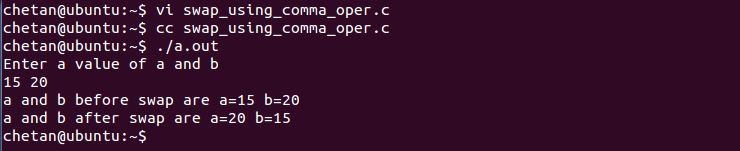
 4. Swapping Using Comma Operator

For this method, you need to know what is the Comma Operator and it's working. Let's see the program.
#include<stdio.h>
int main()
{
        int a,b,temp;

        printf("Enter a value of a and b\n");
        scanf("%d %d",&a,&b);
        printf("a and b before swap are a=%d b=%d\n",a,b);
        temp=a, a=b, b=temp;
        printf("a and b after swap are a=%d b=%d\n",a,b);
        return 0;

}
The output for the above program is

5. Swapping Using Function

For this method, you should know the concept of function. I have not explained the function concept I will explain the function further days. If you know the function then you will understand the code. If you don't know about function then forget this code and check after learning function concept. Let's see the code.
#include <stdio.h>
void swap(int, int);
int main()
{
        int a,b;

        printf("Enter a value of a and b\n");
        scanf("%d %d",&a,&b);
        printf("a and b before swap are a=%d b=%d\n",a,b);
        swap(a,b);
        return 0;
}
void swap(int x, int y)
{
        int temp;
        temp = x;
        x = y;
        y = temp;
        printf("a and b after swap are a=%d b=%d\n",x,y);
}
The output for above program is

6. Swapping Using Pointer  

For this method, you should know the pointer concept. I have not explained the pointer concept I will explain about the pointer further days. If you know the pointer then you will understand the code. If you don't know about pointer then forget this code and check after learning the pointer concept. Let's see the code.
#include <stdio.h>
int main()
{
        int a,b,*x,*y,temp;

        printf("Enter a value of a and b\n");
        scanf("%d %d",&a,&b);
        printf("a and b before swap are a=%d b=%d\n",a,b);
        x = &a;
        y = &b;

        temp = *x;
        *x = *y;
        *y = temp;

        printf("a and b after swap are a=%d b=%d\n",a,b);
        return 0;

}
The output for the above program is

7.  Swapping Using Pointer Function

For this method, you should know the concept of function and pointer. I have not explained the function and pointer concept I will explain the function and pointer further days. If you know the function and pointer then you will understand the code. If you don't know about function and pointer then forget this code and check after learning function and pointer concept. Let's see the code.
#include <stdio.h>
int swap();
int main()
{
        int a,b;

        printf("Enter a value of a and b\n");
        scanf("%d %d",&a,&b);
        printf("a and b before swap are a=%d b=%d\n",a,b);
        swap(&a,&b);
        printf("a and b after swap are a=%d b=%d\n",a,b);
}
int swap(int *x, int *y)
{
        int temp;
        temp = *x;
        *x = *y;
        *y = temp;
        return 0;
}
The output for the above program is
              Please feel free to comment if you find anything incorrect or you want to share more information about the topic discussed above.

Saturday, 29 April 2017

Operators In C Programming Part: 1

April 29, 2017 1
Operators In C Programming Part: 1

            An operator is used to tells the compiler to perform specific mathematical or logical manipulation. Operators are used in the program to manipulate data and variables. The operator needs operand. An operand is a data item on which an operator acts. The operand may be one or more than one. At least one operand is required. 
          C has a large number of an operator that can be categorized in following groups.
  1.  Arithmetic Operators 
  2. Relational Operator
  3.  Logical Operators
  4. Comma Operator
  5.  Bitwise Operators
  6. sizeof Operators
  7. Increment and Decrement Operators
  8. Assignment Operators
  9. Conditional Operators
I will post all operators in 2 parts all with one reference program. In part 1 first 4 operators and in part 2 remaining 4 operators. Let us see one by one operator in detail.

1. Arithmetic Operators 

Arithmetic operators are used perform arithmetic operations. They are of two types are as follows
A. Unary  Arithmetic Operator
B. Binary Arithmetic Operator

A. Unary Arithmetic Operator  

Unary operator name suggests itself it require only one operand to operate.
e.g. +y, -x
It changes the sign of the operand

B. Binary Arithmetic Operator

There are 5 types of Binary Arithmetic Operators. It name suggest that it require 2 operands to be operated.
Operator Purpose
+ Addition
- Subtraction
* Multiplication
/ Division
% Gives the remainder after division
          Note that the %(modulus operator) cannot be applied on floating point operands. Let us see one example how these operators are used. This example is already discussed in Basic C Programs Part: 1 let us the same example.
#include<stdio.h>
main()
{
        float a,b;
        printf("Enter value of a and b\n");
        scanf("%f %f",&a,&b);
        printf("Addition is=%f\n",a+b);         //Print result of addition
        printf("Subtraction is=%f\n",a-b);      //Print result of subtraction
        printf("Multiplication is=%f\n",a*b);   //Print result of multiplication
        printf("Division is=%f\n",a/b);         //Print result of division
        return 0;
}
         The above example shows how Binary Arithmetic Operators are used. The output for the above program is

2. Relational Operators

            Relational operators are used to comparing the values of two operators. These operators compare two values and result in one of two possible outcomes either true or false. It can compare character values or numeric values. Relational operators are as below.
Operator Meaning
< Less than
<= Less than or equal to
== Equal to
!= Not equal to
> Greater than
>= Greater than or equal to
          This Relational operator always returns a value 0 or 1 only. Let us consider following program for better understanding.
#include <stdio.h>
main()
{
        int a=5,b=7,c=10,e=5;

        printf("%d<%d=%d,%d<%d=%d\n",a,b,a<b,c,e,c<e);
        printf("%d<=%d=%d,%d<=%d=%d\n",a,b,a<=b,c,e,c<=e);
        printf("%d==%d=%d,%d==%d=%d\n",a,e,a==e,c,b,c==b);
        printf("%d!=%d=%d,%d!=%d=%d\n",a,e,a!=e,c,b,c!=b);
        printf("%d>%d=%d,%d>%d=%d\n",a,b,a>b,c,e,c>e);
        printf("%d>=%d=%d,%d>=%d=%d\n",a,e,a>=e,c,b,c>=b);
        return 0;

}
The output for the above program is.

3. Logical Operators

        Logical operators combine two or more logical expressions and give 0 or 1 depending on the result is true or false. If the result is true it returns 1 and if the result is false it returns 0. There are 3 types of logical operators as
Operator Name
&& AND
|| OR
! Not
The truth table for And, Or and Not operator
Expression 1 Expression 2 && (Result) || (Result)
True(1) True(1) True(1) True(1)
True(1) False(0) False(0) True(1)
False(0) True(0) False(0) True(1)
False(0) False(0) False(0) False(0)
Expression !(Result)
True(1) False(0)
False(0) True(1)
Let us consider the following  C program for better understanding.
#include<stdio.h>
main()
{
        int a=5,b=7,c=10,e=5,result;

        result=(a<b)||(a>e);
        printf("Result for (a<b) || (a>e) is=%d\n",result);
        result=(a>b)||(a<e);
        printf("Result for (a>b) || (a<e) is=%d\n",result);
        result=(a!=5)||(a<c);
        printf("Result for (a!=5) || (a<C) is=%d\n",result);
        result=(a<b)&&(a>e);
        printf("Result for (a<b) && (a>e) is=%d\n",result);
        result=(a>b)&&(a<e);
        printf("Result for (a>b) && (a<e) is=%d\n",result);
        result=!(a==e);
        printf("Result for !(a==e) is=%d\n",result);
        result=!(a!=e);
        printf("Result for !(a!=e); is=%d\n",result);
 return 0;
}
 The output for above program is 

 4. Comma Operator

           The comma operator(,) is used to permit different expressions to appear in situation where only one expression would be used. The expressions are separated by comma operator.  This operator is Binary Operator.  The comma operator has the lowest precedence of any C operator, and acts as a sequence point. The comma operator helps make code more compact. Let us see one program for comma operator.
#include <stdio.h>
main()
{
       int x=8, y=5, z=10, sum;
        sum=(x, y, z, x+y+z);
        printf("Sum=%d\n",sum);
        return 0;
}
The output for above program is.
           Please feel free to comment if you find anything incorrect or you want to share more information about the topic discussed above.

Thursday, 27 April 2017

Basic C Programs Part: 1

April 27, 2017 0
Basic C Programs Part: 1
           At this point, we learn some basic C programs. Firstly I will compare 2 programs and show you how to reduce extra coding and implement the code with the same output. If you did not read my previous article Constants and Variables In C Programming and Data Types In C Programming I suggest you read it first for better understanding before proceeding further.


Program For Basic Mathematical Operations

         Let us first see the general method(method 1) and the second method(method 2) is a somewhat smart method that can save coding effort and coding time. 

Method 1:

#include<stdio.h>
main()
{
        float a,b,c,d,e,f;
        printf("Enter value of a and b\n"); 
        scanf("%f %f",&a,&b);   //takes two number
        c=a+b;    //Addition
        d=a-b;    //Subtraction
        e=a*b;    //Multiplication
        f=a/b;    //Division
        printf("Addition is=%f\n",c);        //Print result of addition
        printf("Subtraction is=%f\n",d);     //Print result of subtraction
        printf("Multiplication is=%f\n",e);  //Print result of multiplication
        printf("Division is=%f\n",f);        //Print result of division
        return 0;
}

Method 2:

#include<stdio.h>
main()
{
        float a,b;
        printf("Enter value of a and b\n");
        scanf("%f %f",&a,&b);
        printf("Addition is=%f\n",a+b);         //Print result of addition
        printf("Subtraction is=%f\n",a-b);      //Print result of subtraction
        printf("Multiplication is=%f\n",a*b);   //Print result of multiplication
        printf("Division is=%f\n",a/b);         //Print result of division
        return 0;
}

           By comparing two methods we require less code writing and fewer variables. The output for both codes is the same as below
          In later posts, I will tell you where you can use shortcuts in the code. Let us consider another program to find the entered number is an odd or even number.

Program For Find Entered Number is Even Number Or Odd Number

#include<stdio.h>
main()
{
     int number;
     printf("Enter an integer: \n");
     scanf("%d", &number);
     if(number % 2 == 0)
         printf("%d is even.\n", number);   //if condition is true
     else
         printf("%d is odd.\n", number);   // if condition is false
     return 0;
}
The output for the above program is
           Please feel free to comment if you find anything incorrect or you want to share more information about the topic discussed above.